We all are battling with "Swine Flu". News channels are all flooded in these news only. Everyday we receive news of 1-2 persons being killed by this dangerous virus. People here in Pune are really feared with this situation. Person coughed once is also seen in doubt. We cant help on this actually, the symptoms for "Swine Flu" are not different from the normal cold, cough symptoms. People having cold or cough alone are also gathering at Naydu and other government recommended hospitals for swine flu testing. I think this is really dangerous as these people are exposing themselves among the "Swine Flu" infected people. One should get tested if one has following symptoms together: fever, cough, runny\stuffy nose, sore throat, chills, fatigue, headache. Government should educate everyone on these actual Swine Flu symptoms.
This situation will become worse in coming days. Dahi-Handi and Ganapati festivals are approaching. and They are highly celebrated in Pune. We talk about keeping 6-10 feet distance from the infected people but will we be able to control the "H1N1 virus" if people will group together for such activities?. I think, rather than government imply force on janata for not celebrating these festivals in public manner, people here should understand the current situation and act accordingly. I think we should not celebrate "Dahi-Handi" and "Sarvajnik Ganeshostav" this year. People can worship Ganesh Murthi at their home. But in this way also you cant control on people gathering when it comes to the "Ganapati Visarjan". Better option is not to celebrate any festival. The ideal approach would be to observe curfew in the city for at least 10 days. and government should provide medicines to infected persons to their home.
Another thing i observed here is about the Masks distribution. I had to take pair of 3 layered mask for Rs 50. The similar mask was previously available for Rs 5. This is not the condition where we should look for our own benefit, and try to make profit out of the situation. Also even if city is facing shortage of the N-95 masks, everyone is going after them. Doctors have suggested that not everyone need N-95 masks and it is only for relatives of infected personnel. Two 3-layered masks overlapping one another will do.
For the precaution measures i am trying to remain away from Pune. Because right now i don't have any major responsibility work in office, I have taken leaves from office and taking rest here in kalyan. But i wont be able to do this for long time. Like me it is not possible for many people to keep away from work and leave Pune , my advice to them would be to drink a lot of water and juices, Vitamin 'C' food while working.
Considering the population and poverty of the nation, it is really worst thing happened that "Swine Flu" got spread in India. Till now the patients found are from cities only. If "Swine Flu" reaches to villages, then it would be real disaster. Let us hope, before this happens we will take control over it.
Wednesday, August 12, 2009


Saturday, July 11, 2009
Tum Bin Jaaoon Kahan...
Yesterday, I found Hariharan's version of this song in my friend's Orkut favorite videos. I was not aware of this version and movie. The song is sung in full of feelings and i really loved it the manner in which it is used in the movie.
But then critic inside me waked up. I downloaded all 3 versions of this song and started comparing. All of them are truly masterclass. I liked Harharan's version most. This may be because way in which it is used in the movie. You actually feel, hariharan tried to pour a lot of feelings inside it. Only on feelings basis, i will keep Hariharan's version at Top, Rafi's at 2nd position and Kishore's at 3rd position.
Hariharan's Version:
Rafi's Version:
Kishore's Version:
~ Kiran
But then critic inside me waked up. I downloaded all 3 versions of this song and started comparing. All of them are truly masterclass. I liked Harharan's version most. This may be because way in which it is used in the movie. You actually feel, hariharan tried to pour a lot of feelings inside it. Only on feelings basis, i will keep Hariharan's version at Top, Rafi's at 2nd position and Kishore's at 3rd position.
Hariharan's Version:
Rafi's Version:
Kishore's Version:
~ Kiran
Saturday, July 04, 2009
"About Me" Pages
I was going through web to have new way to implement personal profile page. Here I found 60 beautiful and effective About Me pages.
~ Kiran
~ Kiran
Monday, June 22, 2009
Pronounce Name Correctly! :)
This one is really a useful site. In our daily project work, we interact with Americans who have unfamiliar names. This site helps us to pronounce their name correctly. "How to say that Name" : http://www.howtosaythatname.com/
I am glad to see my name in the database. http://howtosaythatname.com/component/option,com_mtree/task,search/Itemid,4/searchword,Kiran/
Check Your Hearing! :)
They say that it is common for people who are over 25 years of age to not be able to hear above 15kHz. I tested my hearing. I can hear up to 17Khz. Check yours. :) http://www.noiseaddicts.com/2009/03/can-you-hear-this-hearing-test/
Wednesday, June 10, 2009
Audit log Design : Using AFTER INSERT, UPDATE, DELETE Trigger
In my last project, we had to implement Audit log functionality for SQL Server Data Changes. Due to very strict timeline(Project was of 2 months and Out of that Audit functionality was having only 10 days to implement), we were goggling for ready made design for Audit functionality. But our efforts gone into vain. Didn't find any good.
SQL Server 2008 is having in built functionality to capture data changes in the form of Change Data Capture Tool(CDC). We tried to convince the client to use the SQL Server 2008. But they didn't agree.:(. We had to go with SQL Server 2005.
We followed trigger based approach. We created AFTER INSERT, UPDATE, DELETE triggers on the all client tables, and recorded all the changes happened. The design was very simple. Hope this helps you guys.
Features included are:
- Audit Log SHOULD have turn off & turn on switch.
- Audit Log MUST capture information like who made the changes, what changes, when the changes occurred.
- Audit Log SHOULD have rollback facility.
- Retrieval of Audit details in Paging.
- Audit retrieval WOULD have following APIs
- Get all changes
- Get all today’s changes.
- Get all changes for period.
- Get all changes for particular transaction.
- Get single Audit Log entry for given Id
Block diagram to show entire architecture used for Audit:

Audit Log Table:

| CREATE TABLE [Administration].[AuditLog]( |
Table Schema:
| | Name | Data Type | Description |
|
| ID | bigint | Primary key - AuditLogID |
| | TransactionID | bigint | Transaction ID used while performing DML query. This column is used to find out all the changes made in single transaction. |
| | ApplicationName | nvarchar(max) | Application though which SQL query is made. |
| | ObjectID | int | Table Id – To know on which table the operation happened. |
|
| OperationID | tinyint | 1 = Delete |
| | PerformedBy | nvarchar(100) | To store who has performed the operation. |
| | PerformedAt | datetime | Time when operation occurred. |
| | TSQL | nvarchar(max) | To store exact query which made this AuditLog entry. |
| | PrimaryKeyColumn | nvarchar(max) | To store primarykey column name of the Table on which operation occurred. |
| | PrimaryKeyValue | int | Primary key value. |
| | PreviousValue | XML | PreviousValue for changed row. |
| | NextValue | XML | CurrentValue for changed row. |

![clip_image002[4]](http://lh4.ggpht.com/_IbmLy40kPiE/Si_Aeg-eTPI/AAAAAAAAACU/YQc0PeM_HMs/s1600-h/clip_image002%5B4%5D%5B2%5D.gif "clip_image002[4]")
Stored Procedures:
1. [Administration].[usp_EnableAuditLog]
Description: Enables Audit for database activities.
| CREATE PROCEDURE [Administration].[usp_EnableAuditLog] AS BEGIN -- All 3 steps are done in transaction-block. -- 1. Create IUD trigger on all ARIC tables. -- 2. Create cleanup job. -- 3. Set Audit flag to true in database. END |
2. [Administration].[usp_DisableAuditLog]
Description: Disables Audit.
| CREATE PROCEDURE [Administration].[usp_DisableAuditLog] BEGIN -- Both below steps are done in transaction-block. -- 3. Set Audit flag to false in database. |
3. [Administration].[usp_GetAuditLog]
Description: Retrieve log depending on specified input parameters.
| CREATE PROCEDURE [Administration].[usp_GetAuditLog] BEGIN -- This Stored procedure is used by below 4 APIs |
4. [Administration].[usp_GetAuditLogEntry]
Description: Retrieves single log information according to AudiLogID.
| CREATE PROCEDURE [Administration].[usp_GetAuditLogEntry] BEGIN -- Retrieves single log information according to AudiLogID |
5. [Administration].[usp_Rollback]
Description: Revert the update change occurred.
| CREATE PROCEDURE [Administration].[usp_Rollback] BEGIN -- Reverts the update change occurred. |
Other Audit Log Fields can be found out by using In built SQL Server functions or DMVs. For example,
TransactionID:
SELECT TRANSACTION_ID FROM SYS.DM_TRAN_CURRENT_TRANSACTION;
ApplicationName:
SELECT program_name FROM sys.dm_exec_sessions WHERE session_id = @@SPID
ObjectID:
Here ObjectID is the tableID in which trigger got fired. We calculated it as follows:
SELECT @ObjectID = parent_id FROM sys.triggers WHERE object_id = @@PROCID;
TSQL:
Here TSQL represents, the query responsible for firing the trigger.
DECLARE @ExecStr NVARCHAR(100);
DECLARE @inputbuffer TABLE
(
EventType NVARCHAR(MAX),
Parameters INT,
EventInfo NVARCHAR(MAX)
)
SET @ExecStr = 'DBCC INPUTBUFFER(' + LTRIM(RTRIM(STR(@@SPID))) + ')'
INSERT INTO @inputbuffer
EXEC (@ExecStr)
SET @TSQL = (SELECT EventInfo FROM @inputbuffer);
OperationID:
SELECT @DeletedCount = COUNT(1) FROM deleted
SELECT @InsertedCount = COUNT(1) FROM inserted
IF @InsertedCount= 0 AND @DeletedCount = 0
RETURN;
SET @OperationID = CASE WHEN @DeletedCount > @InsertedCount THEN 1 – DELETE
WHEN @DeletedCount < @InsertedCount THEN 2 -- INSERT
WHEN @DeletedCount = @InsertedCount THEN 3 -- UPDATE
END
etc…..
~ Kiran
Saturday, March 28, 2009
Meeting with Dr. Kakarmath
Last to last Sunday when I met to Dr. Kakarmath, that was one of the scheduled meeting of Giants International Group.
By the way, I am the member of Giants International Group and Dr. Kakarmath is the president of this group for Kalyan Metro. For last several years, the organization is busy in doing social work, such as helping poor but needy and talented students getting free school books and school dresses, tree plantation on open spaces etc. ( I have mentioned only those activities in which i was involved. Actually there are so many to mention that space here will come short.).
Dr. Kakarmath has been my family doctor for last 10 years. So we have developed good relationship between us. I met him after Giants meeting. In a flow of talk, I just asked him about his dispensary and asked him to come out of the daily paperwork for keeping patients information.(I was knowing the fact that he keeps one file per family and whenever any family member visits his dispensary; he keeps paper, scribbled after checking the patient and prescription given to him, inside it. That is the way, he keeps patients information.). I queried the reason behind not using the software to keep this information. In reply to that, Doctor told me that he was aware of the softwares available in the market but all softwares were meant for the hospitals or for the dispensaries having beds for the patients.
When I see the family doctors in my area, all of them still use diaries or the folders similar to Dr. Kakarmath to keep patients information and their last prescription given. I think small doctors are still away from this Software Revolution. I have promised Dr. Kakarmath to help in this case. and have started working on it. I hope the software which I am implementing will come up as handy tool for him and some of his doctor friends.
As a part of the software, I am done with the database design. And really forcing myself to create a very good UI. I am learning WPF but i think, getting mastery in WPF will take some time. So I will start with Windows Forms only. Some of my friends are also having experience in implementing their own softwares.( obviously in different domain.). Their experiences will guide me to frame user friendly and well presented GUI.
I will keep on posting my experiences on my blog.
~ Kiran
By the way, I am the member of Giants International Group and Dr. Kakarmath is the president of this group for Kalyan Metro. For last several years, the organization is busy in doing social work, such as helping poor but needy and talented students getting free school books and school dresses, tree plantation on open spaces etc. ( I have mentioned only those activities in which i was involved. Actually there are so many to mention that space here will come short.).
Dr. Kakarmath has been my family doctor for last 10 years. So we have developed good relationship between us. I met him after Giants meeting. In a flow of talk, I just asked him about his dispensary and asked him to come out of the daily paperwork for keeping patients information.(I was knowing the fact that he keeps one file per family and whenever any family member visits his dispensary; he keeps paper, scribbled after checking the patient and prescription given to him, inside it. That is the way, he keeps patients information.). I queried the reason behind not using the software to keep this information. In reply to that, Doctor told me that he was aware of the softwares available in the market but all softwares were meant for the hospitals or for the dispensaries having beds for the patients.
When I see the family doctors in my area, all of them still use diaries or the folders similar to Dr. Kakarmath to keep patients information and their last prescription given. I think small doctors are still away from this Software Revolution. I have promised Dr. Kakarmath to help in this case. and have started working on it. I hope the software which I am implementing will come up as handy tool for him and some of his doctor friends.
As a part of the software, I am done with the database design. And really forcing myself to create a very good UI. I am learning WPF but i think, getting mastery in WPF will take some time. So I will start with Windows Forms only. Some of my friends are also having experience in implementing their own softwares.( obviously in different domain.). Their experiences will guide me to frame user friendly and well presented GUI.
I will keep on posting my experiences on my blog.
~ Kiran
Wednesday, March 25, 2009
Delete All Databases Except System Databases
Many times I require to create databases with different configurations for testing purpose.(This includes databases having special characters in their names, databases with different sizes, databases having data files on different locations. etc). As soon as I finish unit testing of the functionality , I have to delete those many databases manually from SQL Server Management Studio.
Today,Two times I had to delete 15 such databases manually :(. But now no more manual work. I have written SQL script for it :)
USE [master]
GO
DECLARE @database_name NVARCHAR (4000);
-- Collect all user created databases into cursor
DECLARE databases_cursor CURSOR FOR
SELECT name FROM sys.databases as d where d.database_id > 4
OPEN databases_cursor
FETCH NEXT FROM databases_cursor
INTO @database_name
WHILE @@FETCH_STATUS = 0
BEGIN
PRINT 'Dropping Database ' + @database_name
DECLARE @cmd NVARCHAR(4000);
SET @database_name = REPLACE(@database_name,']',']]');
SET @cmd = 'ALTER DATABASE ['+@database_name+'] SET SINGLE_USER WITH ROLLBACK IMMEDIATE; DROP DATABASE ['+@database_name+'];'
EXECUTE sp_executesql @cmd
FETCH NEXT FROM databases_cursor
INTO @database_name
END
CLOSE databases_cursor
DEALLOCATE databases_cursor
Saturday, January 24, 2009
KeePass : Password Manager
I have so many passwords with me for every website I visit. Other than that there are Windows Network login, Net Banking, Gmail, Yahoo, MSN, My Office Email passwords. Hussss...the list is endless. It was really difficult task for me to keep remembering all those passwords. Many of the times, I was dependable on 'Forget Password' link to reset my password and set new one. And you will agree me, it is really boredom task.
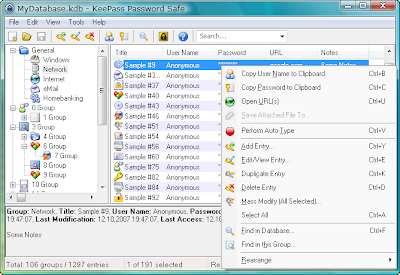
Thanks to KeePass. This software has really saved me from this trouble. KeePass is a free open source password manager, which helps me to manage my passwords in a secure way. You can put all your passwords in one database, which is locked with one master key. So you only have to remember one single master password to unlock the whole database.
I am currently using it and very much satisfied with it. :)
These features (http://keepass.info/features.html) and screenshots (http://keepass.info/screenshots.html) will help the first time users.
~ Kiran

Thanks to KeePass. This software has really saved me from this trouble. KeePass is a free open source password manager, which helps me to manage my passwords in a secure way. You can put all your passwords in one database, which is locked with one master key. So you only have to remember one single master password to unlock the whole database.
I am currently using it and very much satisfied with it. :)
These features (http://keepass.info/features.html) and screenshots (http://keepass.info/screenshots.html) will help the first time users.
~ Kiran
Friday, January 09, 2009
Search Engine for Videos!
Truveo : I was in search for such site so long. Earlier i used to run around video sharing sites (There are so many. YouTube, MySpace, Google Videos, Metacafe etc) for searching any particular video.
This site does this whole thing for me. This search engine lets me find and play videos from all over the web.[:)]
~ Kiran
This site does this whole thing for me. This search engine lets me find and play videos from all over the web.[:)]
~ Kiran
Friday, January 02, 2009
Animoto!
There is a lot of fun on the Internet! Animoto is one of them.
This web application turns your pictures into very interesting movie trailers. and you require only 3 steps to get it. Just a) get your images b) get music background and c) provide some details.
The only single problem is you can produce, remix, and share videos freely of 30 second length only. But it is worth to try this out. :)
Here is my first composition.[:D]
This web application turns your pictures into very interesting movie trailers. and you require only 3 steps to get it. Just a) get your images b) get music background and c) provide some details.
The only single problem is you can produce, remix, and share videos freely of 30 second length only. But it is worth to try this out. :)
Here is my first composition.[:D]
Subscribe to:
Posts (Atom)